Features How It Works Pricing FAQ Add to Chrome — Free
Free Chrome Extension

Your page's Search Console data,
without leaving the page

Stop tab-switching to check GSC. See clicks, impressions, rankings, top queries, and indexing status for any page as a sidebar overlay, in under a second.

7-day free trial · No credit card required · $19 one-time after trial
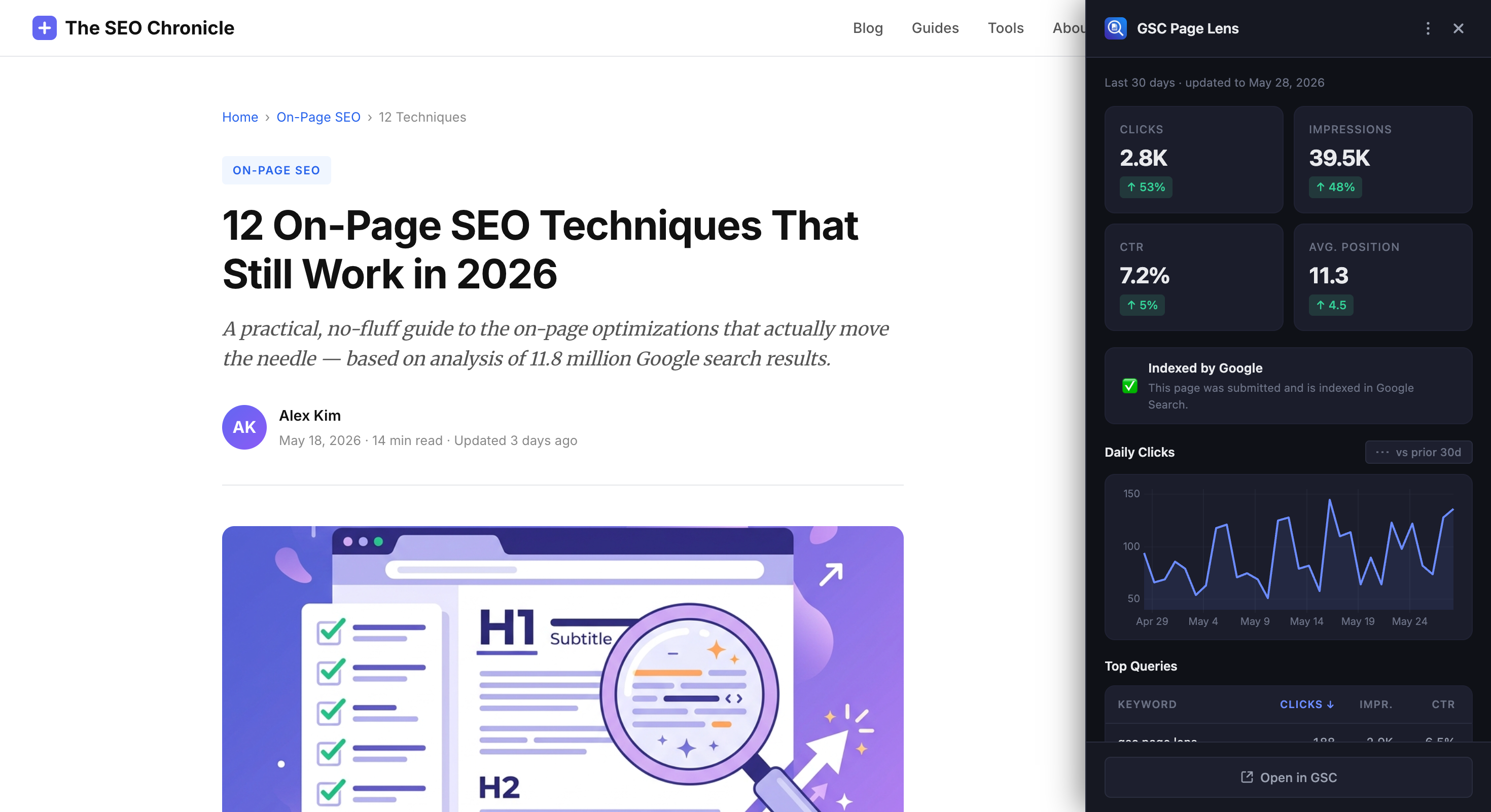
theseochronicle.com/on-page-seo-techniques
GSC Page Lens sidebar showing clicks, impressions, CTR, and top queries for a blog post

Checking GSC shouldn't feel like this

🔄

Constant tab-switching

Open GSC → find property → filter by URL → wait for data → switch back. For every. single. page.

⏱️

Too slow to be a habit

If checking takes 30+ seconds, you skip it. Important ranking drops and content opportunities go unnoticed.

🧠

Context switching kills flow

You're editing a post, want to check its performance, and by the time you're back you've lost your train of thought.

Everything you need, nothing you don't

GSC Page Lens gives you the exact data you'd check in Search Console, without the tab switch.

📊

Performance at a Glance

Clicks, impressions, CTR, and average position — all right there on the page. Instantly spot what's trending up and what needs attention.

Clicks 1,247 +12.3%
Impressions 38.4K +8.1%
CTR 3.2% +0.4%
Position 14.2 -2.1

Traffic Trends

See how your page's traffic has changed over time. Compare against the previous period to catch drops before they become problems.

28 days ago Today

Top Queries

Know exactly which search terms are driving traffic to each page, so you can double down on what's working.

Query Clicks
gsc chrome extension 342
search console sidebar 218
page seo checker 156

Indexing Status

Instantly know if Google has indexed your page, or if something's blocking it. No more guessing.

Indexed
Crawled, not indexed
Not indexed

Instant Data

Your data loads in under a second. Fast enough to check on every page you visit without breaking your flow.

<1s

100% Private

Your data goes straight from Google to your browser. No middleman servers, no tracking, no data collection. Ever.

Google
You
Direct connection — no servers in between

Fits Your Workflow

A resizable sidebar that stays out of your way. Drag it to your preferred width. It remembers your choice across sessions.

Drag to resize

Three clicks to your first insight

1

Install from Chrome Web Store

One click install. No configuration needed. Just connect your Google account and you're ready to go.

2

Navigate to any page

Go to any article or page on a domain you've verified in Google Search Console.

3

Click the icon, see your data

A sidebar slides in from the right with clicks, impressions, top queries, and indexing status. All for that specific page. Done.

The GSC workflow, before and after

😤 Before
  • Open new tab
  • Navigate to search.google.com/search-console
  • Select the right property
  • Go to Performance → Search Results
  • Add URL filter, paste current URL
  • Wait for data to load
  • Switch back to your article tab
  • Forget what you were doing
~45 seconds every time
😎 After
  • Click the extension icon
  • See your data
Under 1 second

One price. Forever yours.

No subscriptions, no tiers, no upsells. Pay once, use it forever.

Lifetime Deal
$ 19 one-time

Pay once. No recurring fees. Ever.

  • 7-day free trial, no card required
  • All features included
  • Lifetime updates
  • No backend — Your data stays yours
  • Syncs across devices via Chrome
Start Free Trial

Install free → 7-day trial → buy only if you love it

Loved by bloggers and SEOs

★★★★★

"I used to dread checking GSC for individual posts. Now I just click the icon while I'm editing. Game changer for my content update workflow."

M
Mighil
Marketing Strategist
★★★★★

"The indexing status badge alone is worth it. I can instantly see which pages Google hasn't picked up yet without opening another tab."

N
Navaneeth
Software Developer
★★★★★

"$19 one-time? For a tool I use 20+ times a day? Easiest purchase decision I've made this year. No subscriptions, no BS."

A
Arshal
UX Designer

Common questions

What data do I need access to?

You need a Google Search Console account with at least one verified property. The extension uses Google OAuth to request read-only access to your Search Console data. It will only read performance data and can't modify anything in your Search Console.

Is my data sent to any external server?

No. GSC Page Lens has no backend server. All API calls go directly from your browser to Google's Search Console API. Your data is cached locally in your browser and never leaves your device.

How does the trial work?

After installing, you get 7 days of full access. No credit card needed, no feature restrictions. The trial starts when you first successfully load data, not when you install, so setup time doesn't eat into your trial. After 7 days, you can purchase a lifetime license for $19.

What does "lifetime" mean exactly?

One payment, use it forever. No monthly or yearly fees. You'll also get all future updates included. The license syncs across your Chrome browsers via your Google account.

Why does the consent screen say "View and manage" my data?

Google's URL Inspection API requires the webmasters scope (not webmasters.readonly), even for read-only inspection requests. This makes the consent screen display "view and manage" language. The extension only reads data and never writes or modifies anything in your Search Console.

Does it work on any website?

It works on any website whose domain is verified in your Google Search Console account. If the site isn't in your GSC, the extension will show a friendly message letting you know. Some special pages (like Chrome's internal pages) block extension sidebars due to security policies. In those rare cases, you'll get a notification with a link to check the data in GSC directly.

Which browsers are supported?

Google Chrome only (version 102+). Firefox and Edge support are not planned for v1 but may be considered in the future.

Stop tab-switching.
Start seeing your data.

Install GSC Page Lens and check any page's search performance in under a second.

Add to Chrome — Free

7-day free trial · $19 one-time after trial